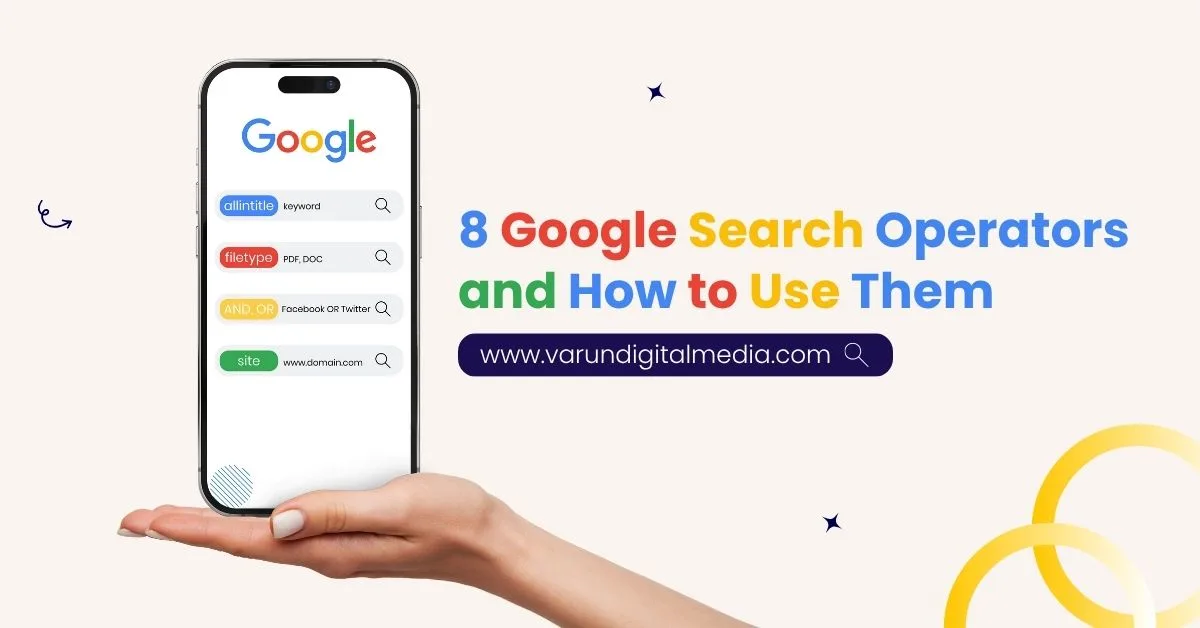
Google search operators help you search with control instead of guesswork. In this guide, you will learn how Google search operators sharpen SEO research, uncover hidden opportunities, and save hours during Site audits, content planning, and competitor review.
Most people use Google every day, yet very few use it with precision. That gap matters. A basic search can return thousands of pages that look relevant but waste time. A structured search can reveal the exact page, file, mention, or pattern you need. That is why search operators still matter for SEO teams, writers, consultants, and brands trying to make better decisions in less time.
Table of Contents
Why Google Search Operators Matter More in 2026
Search is noisier than it used to be. AI summaries, crowded SERPs, repeated content, and mixed intent pages can hide what you actually need. That is where Google search syntax becomes useful.
A strong operator-led search helps you:
- Validate keyword targeting before you publish
- Find indexed pages that should not be visible
- Spot weak content patterns on competitor sites
- Uncover internal linking opportunities faster
- Locate high-value PDFs, reports, and decks
- Narrow broad searches into decision-ready results
At Varun Digital Media, operator-led research fits naturally into broader SEO, content, consulting, and website growth workflows, where search visibility, content planning, and performance refinement work together instead of in silos.
Google Search Operators List: Working, Unreliable, and Deprecated
Before the practical use cases, it helps to know which operators still deserve your attention.
Working with Google search operators:
| Operator | What it does | Example |
| " " | Finds an exact phrase | "Google search operators" |
| OR | Returns either term | seo OR audit |
| AND | Forces both terms | seo AND audit |
| - | Excludes a term | seo -jobs |
| * | Acts as a wildcard | best * seo tools |
| site: | Searches within a domain | site:example.com |
| intitle: | Finds a term in page titles | intitle:seo guide |
| allintitle: | Finds all terms in titles | allintitle:seo checklist |
| inurl: | Finds a term in the URL | inurl:blog |
| allinurl: | Finds all terms in the URL | allinurl:seo guide |
| intext: | Finds a term in the page copy | intext:seo tools |
| filetype: | Filters by file format | seo filetype:pdf |
| ext: | Works like filetype | seo ext:pdf |
| related: | Finds similar sites | related:hubspot.com |
| before: | Filters results before a date | seo before:2023 |
| after: | Filters results after a date | seo after:2024 |
Unreliable Google advanced search operators
Some advanced Google search operators still show partial value, but results can be inconsistent:
- AROUND(X)
- inanchor:
- allinanchor:
- daterange:
- loc:
- location:
Deprecated Google operators
These have little or no practical value now:
- link:
- info:
- phonebook:
- +
Use working operators first. They carry most of the practical value anyway.
1. Quotation Marks and Google search commands for exact-match research
Quotation marks are among the most useful Google search commands because they remove ambiguity.
How it works
Search this:
“Google search operators for seo”
Google will return pages containing that exact phrase, not loose variations.
Why it matters
Quotation marks help when you want to:
- verify exact keyword usage
- check if a phrase is overused across competitors
- find copied content
- confirm branded mentions
This is one of the simplest Google search shortcuts, and it is still one of the strongest.
2. Site operator Google search for index and content discovery
The site operator Google search is one of the most practical tools in SEO.
How it works
Search this:
site:yourdomain.com Google search operators
This shows pages from your domain related to that query.
What you can use it for
- quick index checks
- content cluster discovery
- internal link opportunity scans
- spotting outdated or thin pages
You can also narrow it further:
site:yourdomain.com filetype:pdf
That is where search by filetype Google becomes useful, especially when you are checking whether gated PDFs, whitepapers, or old files are visible in search.
3. intitle and allintitle Google search for keyword competition
If you want to understand how aggressively a keyword is being targeted, title-based operators are useful.
intitle for focused targeting
intitle:Google search operators
This looks for a keyword inside a page title.
allintitle Google search for tighter validation
allintitle:Google search operators
This shows pages with all those words in the title.
Why this matters:
- It gives a quick feel for the competition
- It shows whether a keyword is directly targeted or only mentioned casually
- It helps qualify topics before writing
For SEO work, allintitle Google, allintitle Google search, allintitle search, and allintitle seo are often used to judge whether a long-tail topic is still open enough to pursue.
4. inurl and allinurl Google search for structural research
URL-based operators help reveal how websites organize topics.
inurl example
inurl:seo
allinurl Google search example
allinurl:Google search operators guide
This is helpful for:
- finding blog frameworks
- locating resource pages
- spotting guest post sections
- reviewing competitor content architecture
A clean pattern often tells you a lot about how a site handles topic clusters. That is why an allinurl Google search remains useful during competitor research.
5. OR and Google and search operator for smarter query control
Some topics have multiple keyword versions. Running separate searches wastes time.
OR example
Google search operators OR Google search commands
Google and search operator example
seo AND Google search syntax
These combinations help you:
- compare variations quickly
- widen or narrow intent
- explore adjacent keyword demand
For topic discovery, these are practical advanced search commands that reduce repeated manual searching.
6. filetype Google search and filetype pdf Google search for deeper source discovery
One of the best ways to improve blog depth is to move past blog posts.
filetype Google search example
technical seo audit filetype:pdf
filetype pdf Google search example
Google search operators filetype:pdf
These searches can reveal:
- industry reports
- presentations
- research papers
- templates
- conference slides
That is why filetype Google search, filetype pdf Google search, and search by filetype Google are so useful for building stronger source material and richer content.
7. Related and advanced Google operators for competitor mapping
The related: operator helps you find sites Google sees as similar.
Example
related:hubspot.com
This can help with:
- competitor expansion
- outreach list building
- adjacent market discovery
It is not perfect, though it still has value for early-stage mapping, especially when paired with other advanced Google operators.
8. cache and Google advanced search terms for crawl checks
The cache operator used to be a common way to review Google’s stored version of a page. It is far less dependable now, and many SEO teams no longer treat it as a core diagnostic tool.
Example
cache:example.com
If it works, it can still help you see a stored version of a page. If it does not, do not build your workflow around it. Search Console and crawl tools are more dependable for important checks.
That said, it is still worth mentioning because many lists of Google advanced search terms continue to include it, and many users still search for it.
Search Smarter in 2026 with Varun Digital Media
Broad searches create broad results. Precision creates leverage. We help you filter noise, validate assumptions, and uncover opportunities faster than standard browsing ever will.
Using Multiple Google Search Operators Together
The real strength of advanced search operators in Google appears when you combine them.
Example:
site:yourdomain.com intitle:”Google search operators” filetype:pdf
This lets you filter by:
- domain
- title relevance
- file format
That cuts noise fast and turns Google into a much more useful research layer.
Discontinued and Deprecated Google Search Operators
Some older guides still recommend operators that no longer carry real value. That creates confusion.
Operators like link:, info:, and phonebook: should be treated as legacy references, not practical tools. For current SEO work, stick with the working operator set and test combinations that match your task.
How Google Search Operators Support SEO and Content Strategy
This is where Google search operators for seo move from theory to action.
Content planning
Use title and phrase matching to:
- qualify topics
- spot keyword gaps
- compare keyword versions
- see how aggressively a topic is targeted
Technical SEO
Use site, URL, and file-type searches to:
- spot index bloat
- find exposed documents
- review page patterns
- identify duplicate paths
Link building
Use operator combinations to:
- find guest post pages
- locate resource hubs
- discover competitor mentions
- surface comparison pages without your brand
Internal linking
Use a simple search like:
site:yourdomain.com “target phrase”
That helps you find pages where a contextual internal link can be added quickly.
A Practical SEO Audit Framework Using Google Search Operators
| Step | Goal | Example |
| 1 | Check indexed visibility | site:yourdomain.com |
| 2 | Find exposed files | site:yourdomain.com filetype:pdf |
| 3 | Validate title targeting | allintitle:target keyword |
| 4 | Review URL patterns | allinurl:target topic |
| 5 | Find internal link targets | site:yourdomain.com "target phrase" |
| 6 | Map competitor focus | site:competitor.com intitle:"target keyword" |
| 7 | Find outreach pages | intitle:"write for us" target topic |
This kind of workflow reduces wasted motion and gives SEO teams a sharper starting point before deeper tool-based work.
Why Varun Digital Media Uses Google Search Operators Differently
At Varun Digital Media, search operator usage fits into a broader growth system that includes AI SEO, consulting, content development, email strategy, website performance, social visibility, and conversion-focused execution across channels.
That matters because operator-led research gets stronger when it connects to execution:
- SEO audits that lead to fixes
- content planning that leads to rankings
- internal linking that supports authority
- competitive insights that shape growth decisions
In other words, the search itself is only the start. The business value shows up in what happens next.
Conclusion: Google Search Operators Are Your Competitive Edge in 2026
Most teams still rely on broad searches and surface-level tools. That approach slows decisions and hides real opportunities. The difference today is not access to data. It is how precisely you extract it.
Google search operators shift your approach from searching to analyzing. With the right Google search syntax, you can validate intent before writing, uncover gaps before competitors, and audit performance without waiting on reports.
This is where execution changes.
- You stop publishing content blindly
- You identify ranking gaps before investing time
- You find link opportunities that others never see
- You build stronger internal structures using real search signals
Used consistently, advanced search operators in Google become part of a repeatable system. Not a one-time trick. Not a shortcut. A working layer inside your SEO execution.
At Varun Digital Media, this structured search approach is directly connected to how SEO, content, and growth strategies are built and executed across projects. Because in 2026, search visibility is not about doing more. It is about doing it with clarity, precision, and intent.
Turn Search Insights Into Growth with Varun Digital Media
Get a sharper SEO strategy built on search intent, content precision, and execution that supports rankings and revenue.
Frequently Asked Questions
1. What are Google search operators, and how are they different from normal searches?
Google search operators are special commands that refine what Google shows you. A normal search gives broader results based on Google’s best guess. Operators help narrow results by title, URL, file type, date, or exact phrase, which makes research cleaner and more useful.
2. What is Google search syntax, and why does it matter?
Google search syntax is the structure of a query built with operators, keywords, and filters. It matters because a better query structure leads to better search output. For SEO teams, that means stronger validation, faster research, and fewer false starts.
3. Which Google advanced search operators are most useful for SEO?
The most practical Google advanced search operators for SEO are site:, intitle:, allintitle:, inurl:, allinurl:, quotation marks, and filetype:. These cover most daily research tasks tied to rankings, content, audits, and link discovery.
4. Can Google search operators help with link building?
Yes. Google operators are useful for finding guest post pages, resource hubs, comparison pages, and competitor mentions. They make outreach more targeted and reduce wasted prospecting time.
5. Are Google search shortcuts still worth learning in 2026?
Yes. Google search shortcuts still save time because they reduce broad searching and help you reach better results faster. That becomes even more useful as SERPs get more crowded and mixed in intent.
6. Can a filetype Google search improve content quality?
Yes. filetype Google search and filetype pdf Google search help uncover reports, studies, decks, and whitepapers that can strengthen topical depth, support stronger writing, and improve the overall credibility of a page.
Published: November 13th, 2025