If you want to know how to use header tags correctly, start with one simple idea: headings are not decoration. They guide readers through a page, help search engines read the page structure, and show which ideas matter most.
A page can have strong information and still perform poorly if the headings are weak. Long blocks of text feel tiring. Random H2s confuse readers. Missing H1s make the page look unfinished. Repeated keywords in every heading make the page feel written for bots instead of people.
That is where smart structure makes the difference. Good header tags help users scan faster, improve content clarity, and support SEO without forcing keywords into every line. For businesses, this matters even more. A service page, blog, landing page, or product page should not only attract clicks. It should keep people reading and move them toward action.
Table of Contents
What Is a Header Tag?
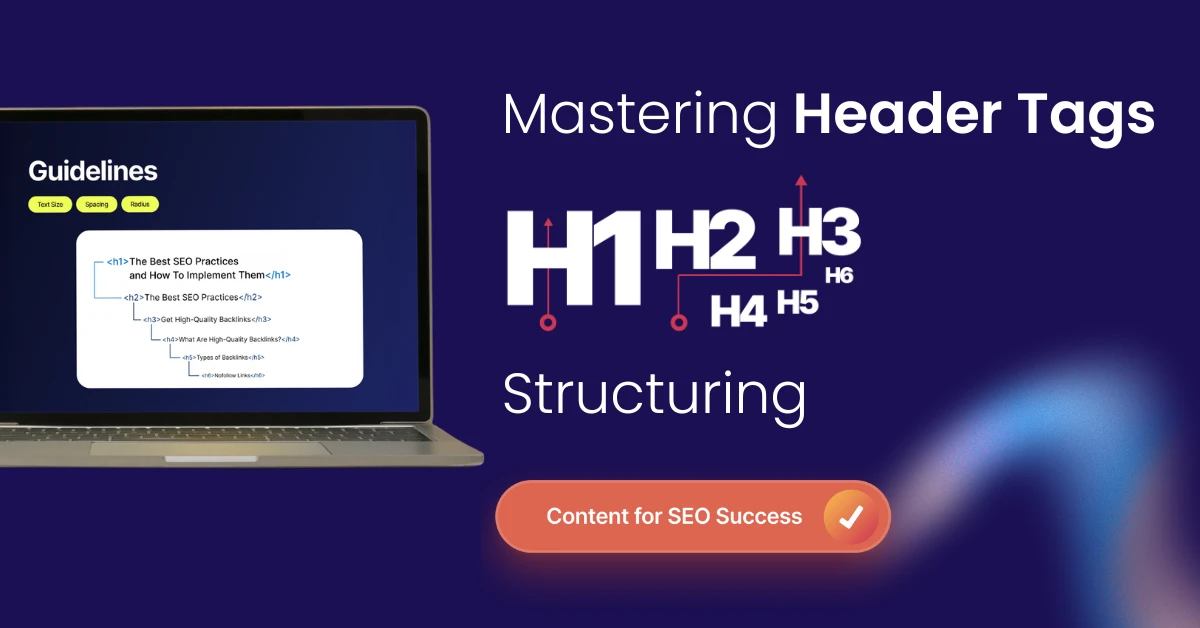
A header tag is an HTML element used to mark headings and subheadings on a web page. These tags run from H1 to H6. In simple terms, header tags tell browsers, readers, and search engines how the content is organized.
Here is the basic structure:
<h1>Main page heading</h1>
<h2>Main section heading</h2>
<h3>Subsection heading</h3>
The H1 usually represents the main topic of the page. H2 tags divide the page into major sections. H3 tags break those sections into smaller points. H4, H5, and H6 are used when the content needs deeper layers, though most blogs and service pages rarely need more than H3.
Think of a page like a book chapter. The H1 is the chapter title. H2s are the major sections. H3s are smaller explanations under those sections. Without this structure, readers have to work harder than they should.
What Are H-Tags and Why Do They Matter?
H tags are another name for heading tags- H1, H2, H3, H4, H5, and H6 elements inside HTML.
For SEO, H tags help define content hierarchy. Search engines use headings to understand topic flow. Readers use headings to decide whether a page is worth their time.
Good H tags help with:
- Better readability
- Clearer page structure
- Stronger topical relevance
- Higher chances of featured snippet visibility
- Improved accessibility for screen reader users
- Better engagement on long pages
This does not mean headings alone will rank a page. They are one part of on-page SEO. Still, poor heading structure can weaken an otherwise strong page.
How to Use Header Tags in SEO Without Keyword Stuffing
The right way to use header tags in SEO is to write headings that explain the section clearly. Keywords can appear in headings, but only where they fit naturally.
A weak heading looks like this:
“Header Tags SEO Header Tags Best Practices SEO Header Tags”
A better heading looks like this:
“How Header Tags Help Search Engines Understand Your Page”
The second one is clearer. It still supports the topic, but it reads like a real heading written for a human reader.
Use this simple rule:
“If the heading sounds awkward when read aloud, rewrite it.”
Search engines have become better at understanding context. You do not need to repeat the same phrase in every H2 and H3. Use related terms naturally.
H1 Header: The Main Signal on the Page
The H1 header is the main visible heading on a page. It tells readers what the page is about before they start reading. For SEO, the H1 should be clear, specific, and aligned with the search intent.
A good H1 usually does three things:
- It includes the main topic
- It tells the reader what they will learn
- It matches the purpose of the page
For this blog, the H1 uses the topic and the primary phrase naturally. That makes the page clear without overloading the heading.
How to Use H1 Tags for SEO
If you are learning how to use H1 tags for seo, keep it simple.
Use one main H1 for the page. Make it relevant to the content. Avoid using the H1 for logos, image text, or decorative sections. Do not repeat the H1 again as an H2.
A strong H1 for a blog might be:
Header Tags: SEO Best Practices for Better Page Structure
A weak H1 might be:
“SEO Header Tags H1 H2 H3 Best SEO Heading Tags Guide”
The second heading is keyword-heavy and unpleasant to read. The first one is useful, clean, and aligned with user intent.
H1 Heading SEO and the Title Tag Difference
The H1 heading and title tag are often confused, but they are not the same.
The title tag appears in search results and browser tabs. The H1 appears on the actual web page. Both can be similar, but they do not have to be identical.
Example:
Title Tag: Header Tags SEO Best Practices
H1: Header Tags: SEO Best Practices for Better Page Structure
The title tag is built for search result clicks. The H1 is built for readers already on the page. Both should support the same topic, but the H1 can sound more natural and helpful.
This is where the H1 heading seo matters. The H1 should confirm to the visitor that they landed on the right page.
H1, H2 & H3 Headers: The Right Page Structure
A clean page structure usually follows this pattern:
H1: Main topic
H2: Main section
H3: Supporting point under that section
H2: Next main section
H3: Supporting point under that section
Here is a simple example for a service page:
<h1>SEO Services for Growing Businesses</h1>
<h2>What Our SEO Services Include</h2>
<h3>Technical SEO Audit</h3>
<h3>Content Optimization</h3>
<h3>Link Building Support</h3>
<h2>Why SEO Matters for Business Growth</h2>
<h3>Better Search Visibility</h3>
<h3>More Qualified Leads</h3>
This structure is clear. Every H3 belongs under an H2. Every H2 supports the H1. That is how h1 h2 h3 headers should work.
Header Structure SEO: What a Strong Layout Looks Like
| Weak Heading Structure | Better Heading Structure |
| H1: SEO Guide | H1: Header Tags: SEO Best Practices |
| H3: H1 Tags | H2: What Is a Header Tag? |
| H2: Important | H2: Why Header Tags Matter for SEO |
| H4: Tips | H3: How to Write Better H2 Tags |
| H2: More SEO | H2: Common Header Tag Mistakes |
The weak version jumps between heading levels and uses vague wording. The better version has a clear order and tells the reader exactly what each section covers.
For any page, your headings should work like a quick outline. If someone reads only the headings, they should still understand the page.
How to Optimize Header Tags for Readers and Search Engines
To understand how to optimize header tags, focus on clarity first. Search engines are trying to match users with helpful pages. If your headings help users, they usually support SEO too.
Use these rules:
- Write one clear H1
- Use H2s for major sections
- Use H3s only when the H2 needs more detail
- Keep headings short where possible
- Avoid repeating the exact keyword across every heading
- Make each heading useful on its own
- Use question headings only when they match search behavior
- Place the most important section higher on the page
A heading should never feel like a placeholder. If it does not help the reader, remove it or rewrite it.
SEO Header Tags and Featured Snippets
SEO header tags can help your content appear in featured snippets when the page is structured well. Google often pulls answers from pages that have clear question-based headings followed by direct, helpful answers.
What Is a Header Tag?
A header tag is an HTML heading element that organizes page content from H1 to H6. It helps readers scan the page and helps search engines understand the content structure.
This format works well because the heading asks a clear question and the answer starts immediately below it.
For list snippets, headings can also help. If your page includes a process, use clear H2 or H3 steps.
How to Use Heading Tags for SEO
- Step 1: Write One Clear H1
- Step 2: Divide Main Ideas With H2 Tags
- Step 3: Add H3 Tags for Supporting Details
- Step 4: Check the Heading Order Before Publishing
This gives search engines a clean structure to read and extract.
How to Use Heading Tags for SEO on Blogs
Blog pages need headings because readers scan before they commit. If the page looks dense, they leave. For blogs, headings should guide the reader through the full topic. Use H2s for key questions, explanations, examples, and process sections.
A blog about email marketing might use:
- H1: Email Marketing Strategy for Small Businesses
- H2: What Makes Email Marketing Still Useful?
- H2: How to Build an Email List the Right Way
- H3: Use Website Forms
- H3: Offer Useful Downloads
- H3: Segment New Subscribers
- H2: Common Email Marketing Mistakes
This helps the blog serve both readers and search engines.
If you are working on long-form SEO content, your headings should do more than divide text. They should create curiosity, answer intent, and keep the reader moving.
How to Use H Tags for SEO on Service Pages
Service pages need a slightly different heading structure. The goal is not only to explain. The page should help buyers trust the service and take action.
A strong service page may include:
- H1: Main service with clear business value
- H2: What the service includes
- H2: Problems the service solves
- H2: Process or delivery approach
- H2: Why choose the provider
- H2: FAQs
- H2: CTA section
This structure works because it follows how a buyer thinks. They want to know what you do, why it matters, how it works, and whether they should contact you.
For Varun Digital Media, this is especially useful across SEO, PPC, content marketing, social media, web design, and digital strategy pages. A clear heading structure helps service pages rank and convert without sounding forced.
HTML Header Tags for SEO: Basic Code Example
If you work inside WordPress, Shopify, HubSpot, or another CMS, you may not need to write HTML manually. Still, knowing the code helps when auditing pages.
A clean HTML heading setup looks like this:
<h1>Header Tags: SEO Best Practices</h1>
<h2>What Is a Header Tag?</h2>
<p>Section content goes here.</p>
<h2>Why Header Tags Matter for SEO</h2>
<p>Section content goes here.</p>
<h3>Readability</h3>
<p>Supporting content goes here.</p>
<h3>Search Context</h3>
<p>Supporting content goes here.</p>
A poor setup looks like this:
<h1>Header Tags</h1>
<h4>SEO Tips</h4>
<h2>More Details</h2>
<h1>Best Header Tags</h1>
The second example skips levels and repeats the H1. It creates confusion for readers, editors, and crawlers.
Common Header Tag Mistakes That Hurt SEO
Many websites use headings casually. That is where problems start.
The most common mistakes include:
- Using more than one H1 without a clear reason
- Skipping from H1 to H3
- Writing vague headings like “Overview” or “More Details.”
- Stuffing keywords into every heading
- Using headings only for font size
- Adding headings inside buttons or design blocks
- Making H2s too long
- Repeating the same heading across many pages
- Using hidden headings that users cannot see
- Leaving important sections without headings
The most damaging mistake is treating headings like design elements. If a line needs to look bigger, designers can style it with CSS. If a line introduces a real section, it should use a proper heading tag.
How to Audit Header Tags Before Publishing
A heading audit does not need to be complicated. You can do it manually or with SEO tools.
Start with these checks:
- Does the page have one clear H1?
- Does the H1 match the page topic?
- Do all H2s support the H1?
- Are H3s placed only under relevant H2s?
- Are any heading levels skipped without reason?
- Do headings sound natural?
- Are keywords used only where they fit?
- Can the page be understood by reading only the headings?
- Does the page answer the search intent better than competing pages?
For larger websites, use crawling tools to find missing H1s, duplicate H1s, long headings, and broken structure across multiple pages.
At Varun Digital Media, heading audits are often part of broader on-page SEO reviews. A page may have strong content, but poor structure can reduce clarity and weaken its ability to rank.
Best Practices for Header Tags in SEO
- Here is a practical set of rules to follow before publishing any page.
- Use the H1 for the main page topic. The H1 should be visible near the top of the page and should not compete with another H1.
- Use H2s to divide the page into main sections. Each H2 should cover a major idea that supports the main topic.
- Use H3s for supporting details. If an H2 has multiple subpoints, H3s can make that section easier to scan.
- Keep heading language natural. A heading should sound like something a real editor would write.
- Match headings with intent. If the searcher wants a guide, your headings should walk them through the answer. If they want a service, your headings should explain value, process, proof, and next steps.
- Avoid keyword repetition. Use exact keywords where they fit, but rely on natural variations and related terms throughout the content.
- Check heading design. H1 should look like the main heading. H2 should look like a section heading. H3 should look smaller than H2 but still noticeable.
- Review mobile layout. Some headings that look good on desktop become too long on mobile. Keep this in mind before publishing.
Header Tags and Accessibility
Header tags also help people who use screen readers. A screen reader can move from one heading to another, allowing users to understand the page layout without reading every line.
This is why heading order matters. If a page jumps from H1 to H4, the structure can feel broken for assistive technology. Accessible heading structure is not only a good practice. It creates a better page for every user.
Measuring the Impact of Header Tags
You can measure heading improvements by tracking user and search behavior after updates. Look at:
- Average engagement time
- Scroll depth
- Organic impressions
- Organic clicks
- Featured snippet changes
- Bounce behavior
- Keyword movement
- Conversion rate on service pages
Header changes may not create instant ranking jumps. Still, they often improve how users interact with the page. Over time, stronger readability and clearer structure can support better SEO results.
How Varun Digital Media Uses Header Tags to Improve SEO Performance
Varun Digital Media treats headings as part of the full page strategy, not an afterthought. Every heading should help the page earn attention, hold attention, and guide the next action.
Our team reviews header tags across:
- SEO blogs
- Service pages
- Landing pages
- Product pages
- Local SEO pages
- Industry pages
- Paid campaign pages
- Long-form guides
The goal is simple: make every page easier to read, easier to crawl, and easier to act on.
For businesses, this matters because a better structure can improve both organic performance and conversions. A user who understands your page faster is more likely to stay, scroll, click, inquire, or book a call.
Final Thoughts
Header tags may look simple, but they shape how a page is read, understood, and judged. A strong H1 sets the topic. H2s create the path. H3s give detail without clutter.
For SEO, headings help search engines understand context. For readers, they make the page easier to scan. For businesses, they help turn content from a block of information into a guided page experience.
The best approach is not to stuff keywords into every heading. The best approach is to write headings that make the page clearer, sharper, and more useful.
If your content is not ranking or converting as expected, heading structure is one of the first things worth checking.
Build Pages That Search Engines and Buyers Understand
Your content should be clear enough to rank and persuasive enough to convert.
Frequently Asked Questions
1. What is a header tag in SEO?
A header tag is an HTML heading element, such as H1, H2, or H3, used to organize content on a web page. In SEO, header tags help search engines understand the topic flow and help readers scan the page more easily.
2. How many H1 tags should a page have?
Most pages should use one H1 tag. This keeps the main topic clear for readers and search engines. Some HTML5 layouts may use more than one, but for blogs, service pages, and landing pages, one clear H1 is usually the better choice.
3. How do I use H2 and H3 tags correctly?
Use H2 tags for major sections and H3 tags for supporting points under those sections. Do not skip heading levels without a reason. A clean H1, H2, and H3 structure makes content easier to read and helps search engines follow the page.
4. Should keywords be used in header tags?
Yes, keywords can be used in header tags when they fit naturally. Do not force the same phrase into every heading. Search engines understand related terms, so use clear language that matches the section and helps the reader.
5. Do header tags help with featured snippets?
Header tags can support featured snippet visibility when the content answers a clear query. Use question-based headings, direct answers, step-based formatting, and clean structure so search engines can understand and extract the answer more easily.
Published: October 28th, 2025